Image featuring key points from this week's TWIL blog post on Notion Database buttons and using VSCode's Debug Console.

Welcome to TWIL, our weekly series designed to spark your curiosity and enhance your technical expertise. In this latest installment, delve into the world of productivity and code efficiency with Emily as she presents on two intriguing subjects. Discover how to streamline your workflows by mastering Buttons in Notion Databases, harnessing the power of Notion's robust Tools. Then, switch gears and boost your debugging skills with Emily's insights on Using the Debug Console in VSCode; an essential Vscode feature that aids in swiftly navigating through code complexities and finding solutions with precision. Join us for a concise learning journey through these compelling software development topics.

Buttons in Notion Databases

Notion recently introduced a new feature for Buttons in Databases. These buttons are added as a column in your database and execute actions that can be configured to change data in other properties.

I’ve jumped on adding this to my personal Task List to mark items as completed and track their completion date:

A screenshot of a dark-themed Notion dashboard showcasing the new button feature in a database task list. The left side displays an organized menu with various productivity categories, while the main panel highlights a "Demo Task" with a clickable button, reflecting the described use of Notion buttons to efficiently manage tasks and track completion dates.

I’m excited to see if Notion introduces better support for targeting related pages or creating dynamic data for updates.

  • Tools
  • Notion
Emily Morehouse's profile picture
Emily Morehouse

Cofounder, Director of Engineering


Using the Debug Console in VSCode

When hitting a breakpoint while running a project via VSCode, you can access not only variables in the sidebar but also a debug console! Here’s what it looks like:
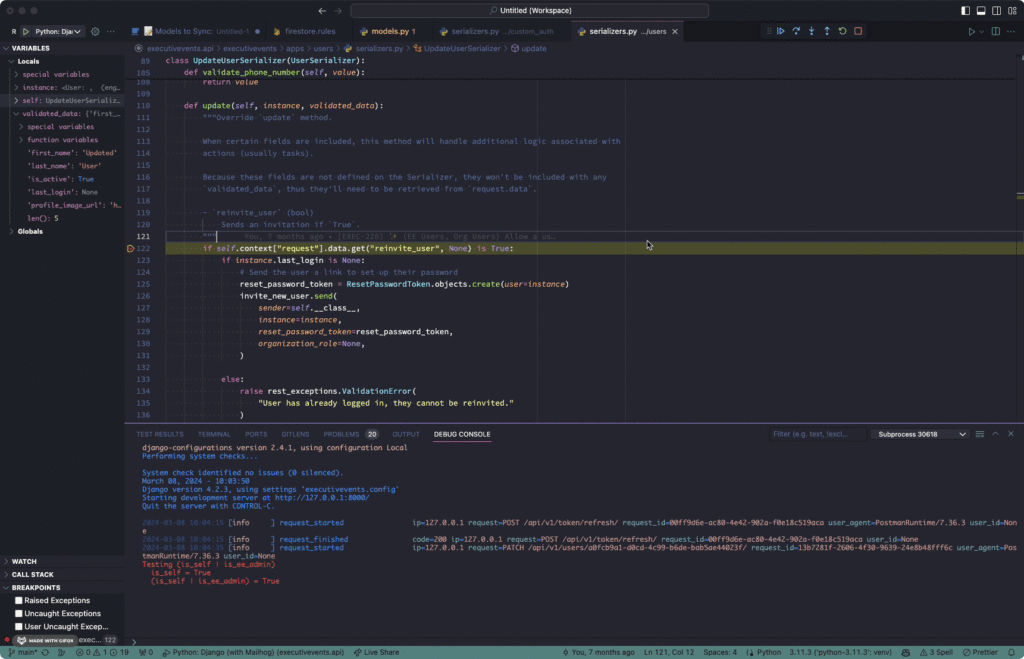
A screenshot of a code editor interface displaying Python code within a Django project, focused on a file named 'serializers.py'. The editor shows a class 'UpdateUserSerializer' with methods that include validation and update functionality. The theme of the editor is dark with code highlighted in different colors for readability. There is an output console at the bottom reporting on server status and recent requests, indicating that the development server is running. There are additional tabs and tools visible indicating that this is an Integrated Development Environment (IDE) with multiple features such as debugging and version control.
  • VSCode
Emily Morehouse's profile picture
Emily Morehouse

Cofounder, Director of Engineering

Related Posts

hree analog clocks showing different times one fast (optimistic), one normal (most likely), one slow (pessimistic) arranged in a row with the PERT formula subtly connecting them. Clean, immediately communicates "time estimation is uncertain"
February 15, 2026 • Frank Valcarcel

Effort Estimation Strategies in 2026: What Actually Works

After years of planning poker and story points, many teams are questioning whether traditional estimation methods actually deliver value. Here’s a practical look at estimation strategies that work in 2026, from time-tested techniques to emerging AI approaches.

AWS logo centered over dark blue stylized map of Europe with concentric radar-style rings emanating from Germany, representing the AWS European Sovereign Cloud infrastructure launch for EU data sovereignty and GDPR compliance
January 26, 2026 • Frank Valcarcel

AWS Launches European Sovereign Cloud

AWS launched a physically separate cloud infrastructure in Europe with EU-only governance, zero US dependencies, and over 90 services. Here is what organizations in healthcare, finance, and government need to know about the sovereign cloud and how to evaluate it for their compliance strategy.

Let's work together

Tell us about your project and how Cuttlesoft can help. Schedule a consultation with one of our experts today.

Contact Us